Ads make pages slower, busier and harder to use, and on download pages they hide the real button. DOWNLOAD IT's browser has HUSH ad blocking built in and switched on from the very first page.
Step by step
- Open any page in DOWNLOAD ITHUSH is already on. There's nothing to install or turn on.
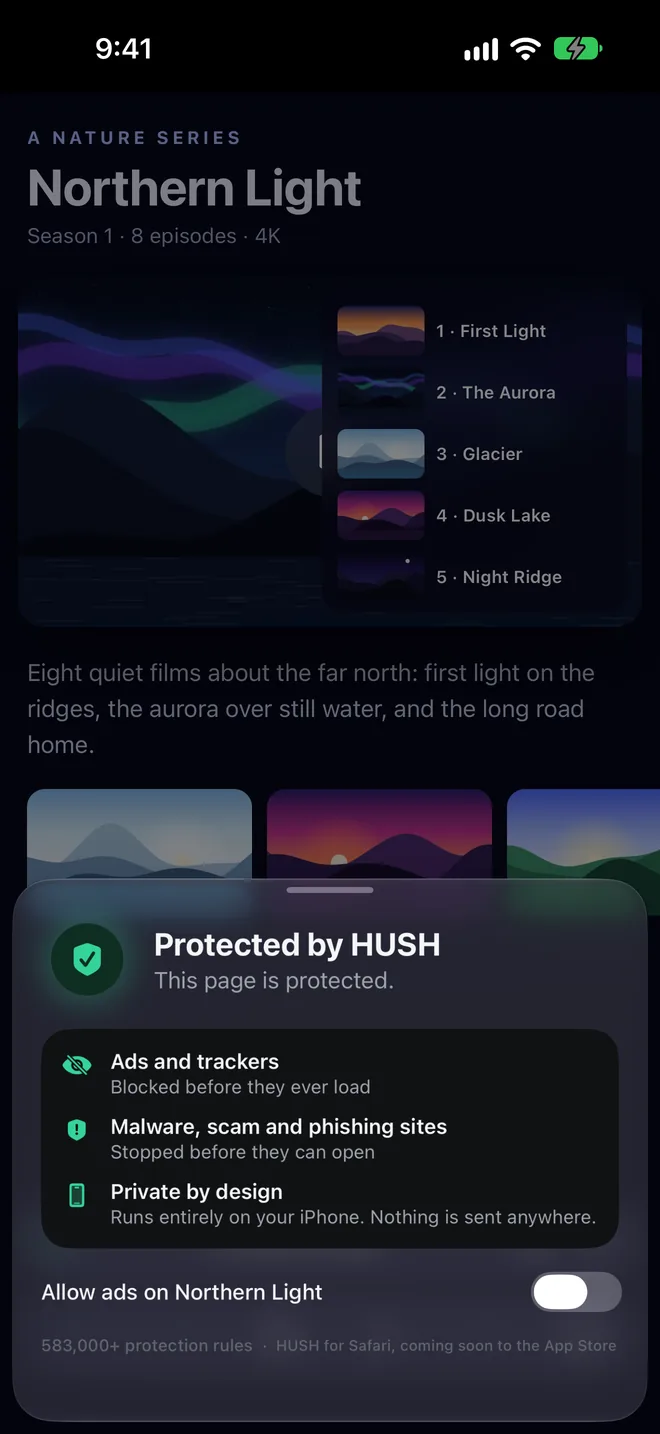
- Watch the shieldThe green shield shows the page is protected: ads and trackers blocked before they load, and malware, scam and phishing sites stopped before they open.
- Support a site you likeTurn on Allow ads for that site and the page reloads with its ads.
- Want it in Safari too?HUSH is also its own app for Safari, at hushblocker.app.
HUSH runs entirely on your device with more than 583,000 protection rules. Nothing about the pages you visit is sent anywhere.
More guides
Everything on the web, one tap from yours.
DOWNLOAD IT is coming soon to the App Store for iPhone, iPad and Mac.