Most websites play video inside a player with no save button. DOWNLOAD IT's browser finds the video for you and saves it as a normal video file you can keep, play offline, or send to Photos.
Step by step
- Open the page in DOWNLOAD ITType the address or search from the start page, like any browser.
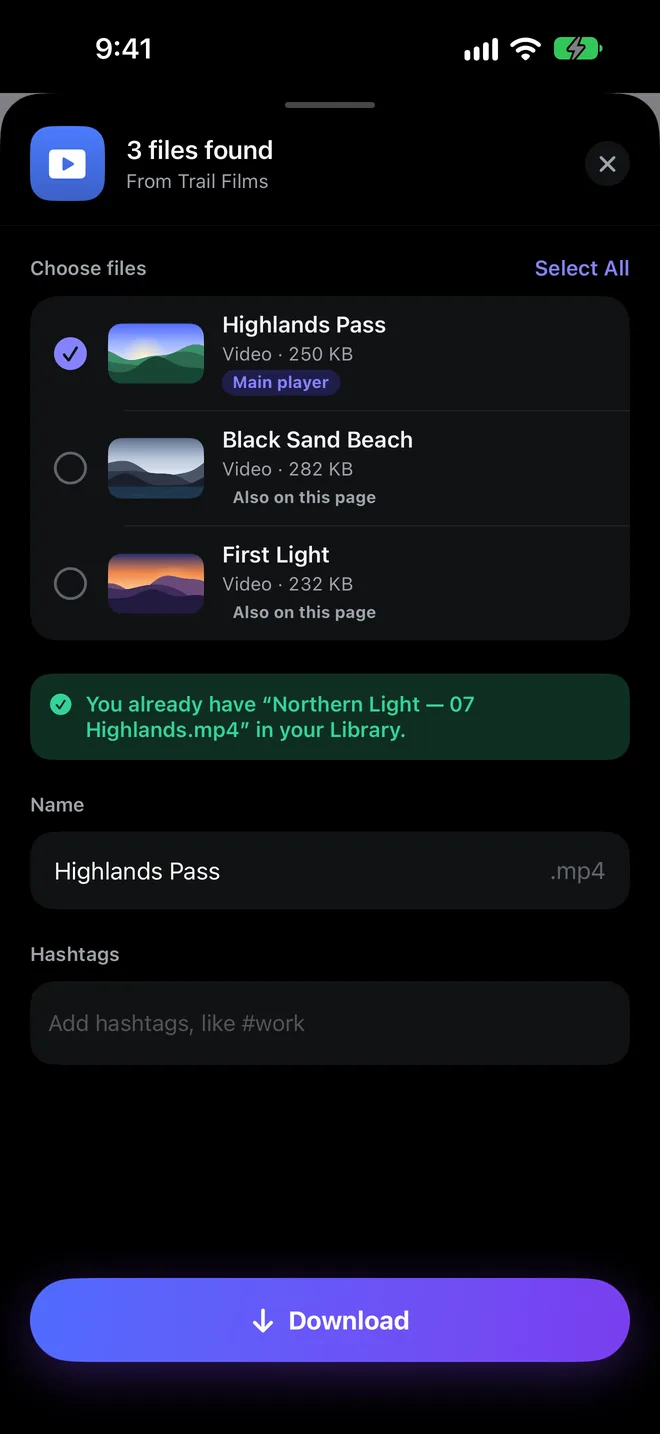
- Tap This video, or Get allWhen DOWNLOAD IT finds a video, it offers to save it. On a page with a season or a playlist, Get all saves every episode. If nothing appears, tap the hand and touch the video player.
- Check it's the right oneThe main player is already selected at its best quality, and every other video on the page is listed with its size.
- Tap DownloadIt saves in the background, up to ten at a time. Find it in your Library under Videos.
- Keep it, play it, or send it to PhotosPlay it in the built-in player with Picture in Picture, or tap Save to Photos.
DOWNLOAD IT saves video that websites make available, including streamed video, and saves it as an MP4. It never downloads from protected streaming services or encrypted (DRM) video. Only save what you have the right to.
More guides

Everything on the web, one tap from yours.
DOWNLOAD IT is coming soon to the App Store for iPhone, iPad and Mac.